.svg)


.svg)
Syslogs Setup
Overview
Syslogs Setup allows administrators to forward Cywift system logs to an external Syslog server for centralized monitoring, auditing, and security analysis.
Syslogs help security and compliance teams track authentication events, configuration changes, and system activity in real time.
Navigation Path
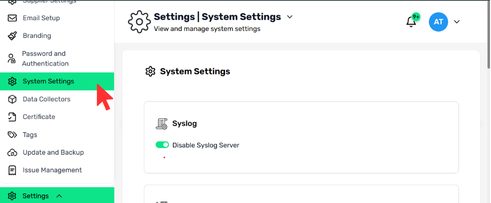
- Login to Cywift
- Go to Settings
- Select System Settings
- Click Syslog
Disable / Enable Syslog Server
Toggle Disable Syslog Server to:
- ON → Syslog forwarding is stopped
- OFF → Syslog forwarding is active
Only Admins can manage this setting.
.png)