.svg)


.svg)

System Update
Overview
System Update in Cywift allows administrators to keep the platform up to date by uploading and applying official update packages. Regular system updates ensure access to new features, performance improvements, and important security fixes.
Accessing System Update
- Go to Settings.
- Open Update and Backup.
- Select the Update section.
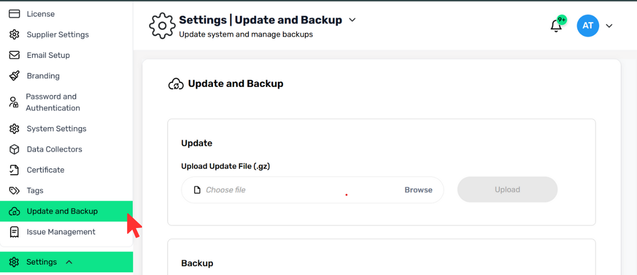
Uploading a System Update
- Upload Update File (.gz)
- Cywift updates are provided as compressed update files with a .gz extension.
Steps to Upload an Update:
- Click Choose File or Browse.
- Select the update file with the .gz format from your local system.
- Click Upload to start the update process
Update Process Behavior
- The system validates the uploaded update file before applying it.
- During the update process:
- System services may restart.
- Users may experience temporary unavailability.
- Once completed, the system applies the update automatically.
Important Notes
- Only authorized administrators can perform system updates.
- Ensure a recent backup exists before applying any update.
- Upload only update files provided by Cywift to avoid system issues.
.png)