.svg)


.svg)
Global Authentication Settings
Overview
Global Authentication Settings define organization-wide authentication and password policies that apply to every user in the tenant. These are administered centrally and enforced uniformly to maintain security posture and compliance.
Who Can Manage Global Authentication Settings
- Administrators only
- Users with permissions to manage security and authentication policies
Standard users cannot modify global authentication rules.
Navigation Path
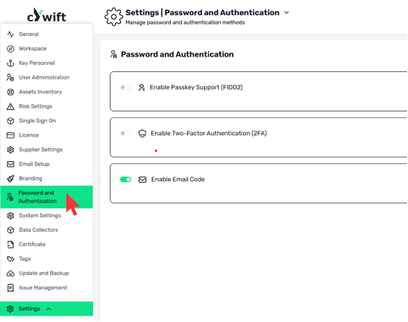
Follow the steps below to access Global Password & Authentication Settings:
- Log in to the Cywift GRC Platform with an administrator account.
- Go to Settings from the main menu.
- In the Settings search bar, search for Password and Authentication.
- Click on Password and Authentication from the results.
You will now see the global authentication options, including:
- Enable Passkey Support (FIDO2)
- Enable Two-Factor Authentication (2FA)
- Enable Email Code Authentication
Global Authentication Controls
Enable Passkey Support (FIDO2)
- When enabled, the organization allows users to authenticate using passkeys (FIDO2).
- Supports passwordless, phishing-resistant authentication
- Users can register and use passkeys only if this option is enabled
- When disabled, passkey options are unavailable for all users
Enable Two-Factor Authentication (2FA)
- Controls whether Two-Factor Authentication (2FA) is available across the organization.
- Adds an additional security layer during login
- Users may configure 2FA only when this setting is enabled
- Recommended for all organizations handling sensitive data
Enable Email Code Authentication
- When enabled, users can authenticate using email-based verification codes.
- Provides an alternative authentication method
- Useful when passkeys or 2FA are not available
- Acts as a fallback authentication option