.svg)


.svg)
NTP Servers & Timezone Setup
Overview
This section allows administrators to configure time synchronization and time zone settings. Accurate system time is critical for logs, audits, security events, and compliance reporting.
Navigation Path
- Login to Cywift
- Go to Settings
- Select System Settings
- Open NTP Server Setup or Server Time Zone
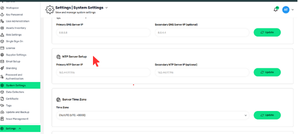
NTP Server Setup
Primary NTP Server IP
- Required
- Example: 163.44.97.196
Secondary NTP Server IP (Optional)
- Backup time server
- Used if primary NTP is unavailable
How to Update
- Enter NTP server IPs
- Click Update
Server Time Zone
.png)
Time Zone
- Select your organization’s local time zone Example: Etc/UTC (UTC, +0000)
How to Update
- Select the correct Time Zone
- Click Update