.svg)


.svg)
Set up Backups & Restoration
Overview
Backup & Restoration in Cywift enables organizations to protect critical system data by creating secure backups and restoring data when required. Backups are stored on a configured SFTP server and can be scheduled or triggered manually to ensure data availability and business continuity.
Accessing Backup & Restoration
- Go to Settings.
- Select Backup.
- Review and configure backup and restoration options.
Backup Configuration
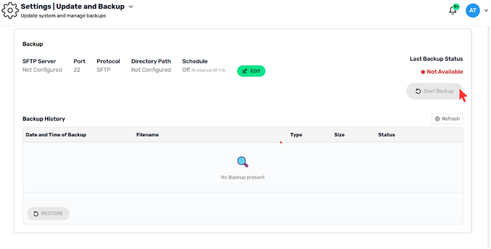
- Backups are stored on an external SFTP server to ensure secure off-platform data protection.
SFTP Server
- Displays the current SFTP server configuration status.
- If not configured, backups cannot be stored externally.
Port
- Default port: 22
- Used for secure SFTP communication.
Protocol
- Backup transfers use the SFTP protocol for encrypted data transmission.
Directory Path
- Specifies the directory on the SFTP server where backup files are stored.
- Must be configured before enabling scheduled backups.
Backup Schedule
Schedule Status
- Indicates whether automated backups are enabled or disabled.
- Default state: Off
Backup Interval
- When enabled, backups can run at defined intervals (e.g., every 1 hour).
Edit Backup Settings
Click Edit to:
- Configure the SFTP server
- Set the directory path
- Enable or modify the backup schedule
Manual Backup
Start Backup
- Click Start Backup to trigger an immediate backup.
- Useful before system changes or maintenance activities.
Last Backup Status
- Displays the status of the most recent backup.
- If no backup has been performed, the status shows Not Available.
Backup History Table
Displays:
- Date and Time of Backup
- Filename
- Backup Type
- File Size
Backup Status
If no backups exist, the table displays No Backup present.
Refresh
Click Refresh to reload the latest backup records.
Restore Backup
Restore
- Use the Restore option to recover data from an existing backup file.
- Restoration is available only if valid backups are present in the history.
Restoring a backup may overwrite current system data. Ensure you select the correct backup file before proceeding.