.svg)


.svg)
Setup New Workspace
Overview
A Workspace in Cywift represents an independent tenant where compliance frameworks, controls, risks, users, and reports are managed separately.
Organizations use workspaces to manage different departments, clients, subsidiaries, or regulatory scopes within the same Cywift instance.Only authorized Admin users can create or manage workspaces.
Navigation Path
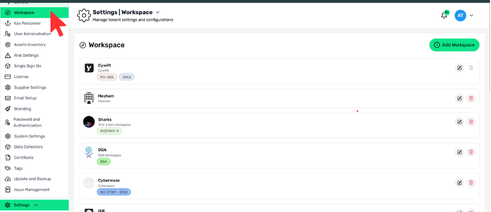
Login to Cywift → Settings → Workspace
Add New Workspace
Steps
- Go to Settings → Workspace
- Click Add Workspace
- Fill in the Workspace Details
.png)
.png)
Workspace Logo
- Upload a logo for the workspace
- Size: 256 × 256
- Formats: PNG, JPG, GIF
- Max size: 1 MB
Name
- Unique workspace name
Key-ID
- Short identifier (e.g., ACME, COMP1)
- Replaces CyID in control identifiers
- Example: ACME-001
Control Setup (Important)
This section defines how controls are created in the workspace.
Available Options:
1. Create tenant without controls
- Workspace is created empty
- No controls are added initially
Best for:
- Custom control frameworks
- Manual control configuration
- Future framework mapping
2. Inherit controls from Default Tenant
- Copies existing controls from the default Cywift tenant
Useful when:
- You want standard baseline controls
- Maintaining consistency across workspaces
- Faster setup with predefined controls
Description
Explain:
- What the workspace does
- How it operates
- Its business or compliance purpose
Associated Frameworks
You can:
- Select frameworks manually (ISO 27001, SOC2, PCI-DSS, etc.)
- Or Replicate Framework(s) from Company
- Select an existing company
- Frameworks will auto-populate
This helps standardize compliance across workspaces.
Workspace Admin
Assign a user who will:
- Manage compliance and corrections
- Oversee risk and governance activities
- Operate day-to-day workspace actions
- Search by name or email to assign.
Save Workspace
- Review all fields
- Click Save
- Workspace appears in the workspace list
.png)
Editable Fields
- Workspace logo
- Description
- Control Setup (inherit / without controls – if applicable)
- Associated frameworks
- Workspace admin
⚠️ Key-ID and Default Workspace cannot be modified
Delete Workspace
- Available only for non-default workspaces
- Click the Delete icon
- Use carefully (data loss risk)