.svg)


.svg)

SSL Certificate
Overview
SSL Certificates secure communication between users and the Cywift platform by encrypting data in transit. Managing SSL certificates ensures your Cywift instance remains trusted, secure, and compliant with security standards.
This section allows administrators to view current certificate details and update or replace the SSL certificate when required.
Navigation Path
- Login to Cywift
- Go to Settings
- Select SSL Certificate
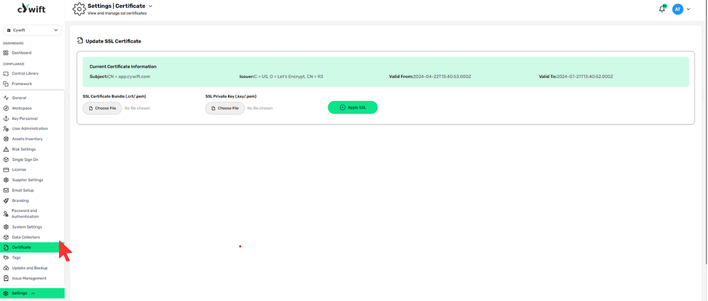
Steps to Update SSL Certificate
- Navigate to Settings → SSL Certificate
- Review current certificate details
- Under SSL Certificate Bundle, click Choose File
Upload the .crt or .pem file
- Under SSL Private Key, click Choose File
Upload the .key or .pem file
- Click Apply SSL
The new certificate will be applied to the Cywift application.
After Applying SSL
- HTTPS connections will use the new certificate
- Browser trust warnings should be resolved (if the certificate is valid)
- No restart is typically required unless specified by deployment setup
Common Issues & Troubleshooting
Certificate Not Applied
- Ensure certificate and private key match
- Confirm correct file format (.crt/.pem and .key/.pem)
- Verify certificate chain is complete