.svg)


.svg)
DNS Server Setup
Overview
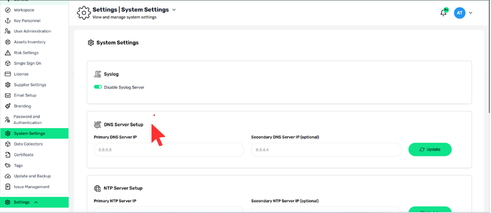
DNS Server Setup allows administrators to define which DNS servers Cywift uses to resolve domain names. Correct DNS configuration ensures reliable connectivity to external services, integrations, and updates.
Navigation Path
- Login to Cywift
- Go to Settings
- Select System Settings
- Click DNS Server Setup
Configuration Fields
Primary DNS Server IP
- Required
- Example: 8.8.8.8
Secondary DNS Server IP (Optional)
- Used as a fallback if the primary server is unreachable
- Example: 8.8.4.4
How to Update DNS Settings
- Enter the Primary DNS Server IP
- (Optional) Enter the Secondary DNS Server IP
- Click Update