.svg)


.svg)

Default Timeout Setting
Overview
Timeout Settings allow administrators to control session security and device trust, reducing the risk of unauthorized access due to inactivity.
Navigation Path
- Login to Cywift
- Go to Settings
- Select System Settings
- Click Timeout Settings
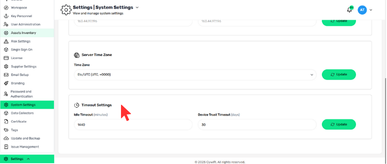
Configuration Options
- Idle Timeout (minutes)
- Defines how long a user session can remain inactive
- Example: 1440 minutes (24 hours)
- After timeout, users must re-authenticate
Device Trust Timeout (days)
- Defines how long a trusted device remains valid
- Example: 30 days
- After expiry, re-verification is required
How to Update Timeout Settings
- Set Idle Timeout
- Set Device Trust Timeout
- Click Update