.svg)


.svg)
Email-setup
Overview
The Email Setup module in Cywift allows administrators to configure how system emails are sent. These emails include user invitations, password resets, alerts, notifications, and other system communications.
Cywift supports two email configuration methods:
- Microsoft 365 Email Setup
- SMTP Email Configuration
Admins can enable either one based on their organization’s email infrastructure.
Navigation Path
- Log in to Cywift
- Go to Settings
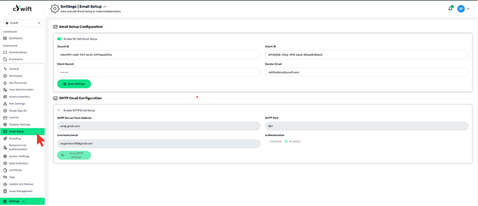
- Open Email Setup
Microsoft 365 Email Setup
This option allows Cywift to send emails using Microsoft 365 (Outlook / Exchange) via secure API-based authentication.
Enable MS 365 Email Setup
Turn this option ON to activate Microsoft 365 email sending.
.png)
Configuration Fields Explained
Tenant ID
- Identifies your organization’s Microsoft Azure tenant.
- Provided by Microsoft Azure portal.
Client ID
- Unique application ID registered in Azure AD.
- Used to authenticate Cywift with Microsoft 365.
Client Secret
- Secure key associated with the Client ID.
- Used for authorization.
- Hidden for security purposes.
Sender Email
- The email address from which all system emails are sent.
- Must exist in the Microsoft 365 tenant.
.png)
Saving MS 365 Settings
- Click Save Settings after entering all details.
- If the credentials are valid, Cywift will start sending emails via Microsoft 365.
SMTP Email Configuration
This option allows Cywift to send emails via a standard SMTP server (e.g. Gmail, Outlook, private mail servers).
Enable SMTP Email Setup
Turn this option ON to activate SMTP-based email delivery.
.png)
Configuration Fields Explained
SMTP Server / Host Address
- The hostname of your SMTP provider.
SMTP Port
- Defines the port used for email transmission.
Username / Email
- Email address used to authenticate with the SMTP server.
- Usually the sender account.
Authentication
Controls whether SMTP authentication is required.
Options:
- Enabled (recommended)
- Disabled (not secure)
Authentication should always be enabled for production systems.
.png)
Saving SMTP Settings
Click Save SMTP Settings to apply the configuration.
What Emails Use This Configuration
- User invitations
- Password reset emails
- Login & security alerts
- Compliance notifications
- System-generated alerts
Troubleshooting
- Emails not received → Check credentials & sender email
- Authentication error → Verify Client ID / Secret or SMTP login
- Emails in spam → Use verified domain email