.svg)


.svg)
Branding & Localisation
Overview
Branding & Localisation allows organizations to personalize the Cywift platform to match their corporate identity. Administrators can customize logos, colors, email branding, and report branding, ensuring a consistent and professional experience across the application, communications, and exported reports.
All branding changes are applied at the tenant level and can be previewed in real time before finalizing.
Live Preview Functionality
- Cywift provides a live preview experience for branding updates:
- Changes are displayed instantly as you upload or modify branding elements.
- Helps validate design, alignment, and visibility before saving.
Accessing Branding Settings
- Navigate to Settings.
- Select Branding.
Configure branding options under the available sections:
- Platform Branding
- Email Branding
- Reports Branding
Platform Branding
.png)
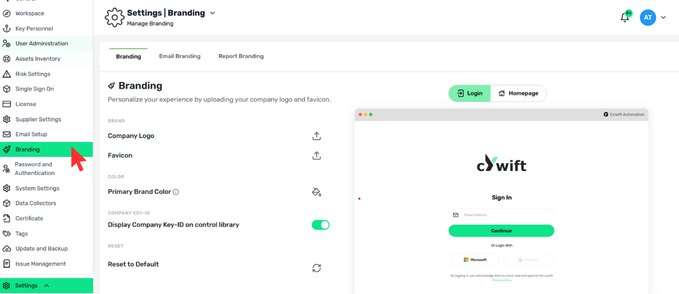
Platform Branding controls the visual identity of the Cywift web application.
Company Logo
- Upload your organization’s logo to appear across the platform interface.
- Recommended for clear brand recognition.
Favicon
- Upload a favicon that appears in the browser tab.
- Helps users quickly identify the Cywift tab.
Primary Brand Color
- Define your organization’s primary color.
- This color is applied to key UI elements such as buttons and highlights.
Company Key-ID Display
- Enable Display Company Key-ID on Control Library to show your unique company identifier within the control library.
Reset to Default
- Restores all platform branding settings to the Cywift default configuration.
Email Branding
.png)
Email Branding customizes how system-generated emails appear to users.
Email Header
- Upload a header image displayed at the top of emails.
Email Logo
- Upload a logo to be shown within email content.
Email Footer
- Add a footer image or branding element for consistency and professionalism.
Reset to Default
- Reverts all email branding changes to the default Cywift email design.
Reports Branding
.png)
Reports Branding allows customization of logos used in exported reports.
Report Logo
- Upload a logo that appears on exported report cover pages.
- This setting is tenant-specific and applies only to reports generated within the current tenant.
Live Report Preview
- Any change made to report branding is reflected immediately in the live report preview, allowing administrators to verify appearance before exporting.
Reset to Default
Resets report branding back to the default Cywift report design.